Convert DNG and RAW photos to JPG on Android
Short answer
To convert a DNG to JPG on Android, open Stripix, tap Convert and pick the DNG in the photo picker. JPG is already selected, so tap Convert 1 photo and save the JPG to the Stripix album. Stripix develops the RAW file on your phone, and nothing is uploaded. The Convert tool shows every format it takes.
Can’t open a DNG file on Android?
A DNG is a RAW file: the light the camera’s sensor recorded, before it is turned into a picture. Upload forms, messengers and many gallery apps expect a finished JPG, so they refuse a DNG or show only the small preview stored inside it. A JPG made from it opens everywhere.
DNG files usually come from one of these:
- A Pixel saves a DNG next to the JPG when RAW is turned on in its camera settings.
- Samsung’s Expert RAW app saves DNG files.
- Lightroom captures and exports DNG.
- Open Camera saves a DNG when its RAW option is on.
Cameras save their own RAW formats, like CR3 or NEF, and Stripix opens those too.
Convert a DNG to JPG with Stripix
Step 1: Pick the DNG
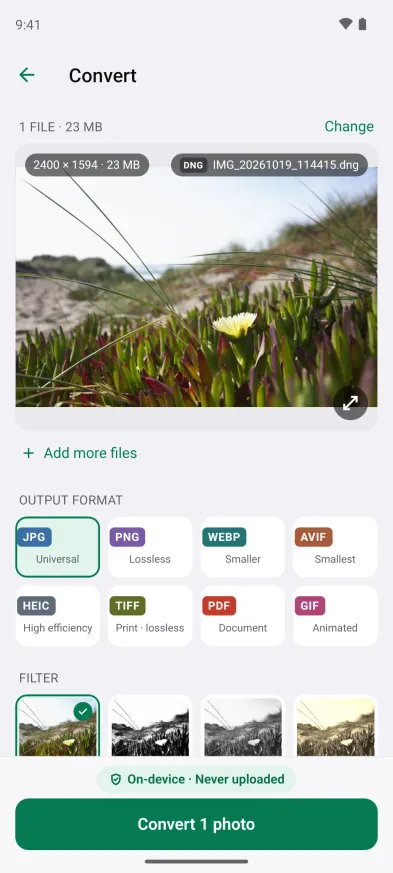
Open Stripix and tap Convert. Select the DNG in the photo picker and tap Add. For RAW files from a camera’s memory card or a folder, tap Files on the Home screen instead.
A 23 MB DNG from Downloads, ready to convert to JPG at 85% quality.


Step 2: Check the format and the size
The file shows a RAW · DNG badge, and JPG at 85% is the default. Under Quality Stripix estimates the new size, like 23 MB → ~796 KB for this DNG. Lower Quality for a smaller file, or choose PNG for a lossless copy.
Step 3: Convert
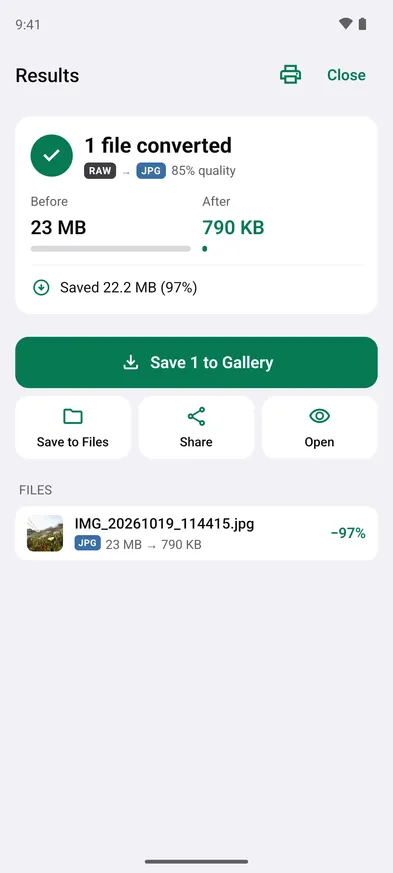
Tap Convert 1 photo. Stripix develops the RAW on your phone and writes the JPG.
23 MB of RAW became a 790 KB JPG.
Step 4: Save or send
Tap Save 1 to Gallery to put the JPG in the Stripix album, Save to Files to pick a folder, or Share to send it straight to another app. The DNG stays where it was.
Good to know on Android
- Developed on your phone. Stripix develops RAW files itself, with LibRaw, on the phone. When a RAW is too big for the phone’s memory, it is developed at half the size, or from the largest preview inside the file.
- Every RAW format it takes. DNG, ARW, CR2, CR3, NEF, NRW, ORF, RAF, RW2, PEF, SRW, X3F, 3FR, IIQ, ERF, KDC, MOS, MRW, DCR, SR2 and SRF.
- The location stays out. Like every conversion, the JPG leaves the location out unless you change Metadata. How to see all the metadata in a photo on Android shows what else a photo can carry.
- HEIC works the same way. For HEIC photos that a Windows PC won’t open, see Samsung HEIC photos won’t open on Windows?.
- Upload limits. A JPG from a RAW is still large for most forms. How to reduce photo size to 200 KB on an Android phone gets it under the limit.
- Free and Pro. One file at a time to JPG or PNG is free. Batches, like a whole memory card, are part of Pro.
Questions
Which RAW files does Stripix open?
DNG and the RAW files of most camera makers: ARW, SR2 and SRF from Sony, CR2 and CR3 from Canon, NEF and NRW from Nikon, ORF, RAF, RW2, PEF, SRW, X3F, 3FR, IIQ, and older ERF, KDC, DCR, MOS and MRW files.
Does the JPG have as many pixels as the RAW?
Not always. Stripix develops the RAW within the memory it can use on your phone. A RAW too big for that is developed at half the size, or from the largest preview stored in the file.
Is converting a RAW file free?
One file at a time, to JPG or PNG, is free. Batches and the other output formats are part of Stripix Pro, which you buy through Google Play.
Does the RAW file change?
No. Stripix works on a copy and writes a new JPG. The DNG stays where it was.