
AVIF image won't open on Android? Convert it to JPG
Short answer
AVIF image won’t open on Android? Convert it to JPG on your phone. Open Stripix, tap Convert, pick the AVIF images in the photo picker and tap Convert. Stripix reads AVIF on every Android version it runs on, from Android 10, and nothing is uploaded. The Convert tool shows every format it takes.
Why an AVIF image won’t open
AVIF is an image format websites use because the files are small. When you save an image from a site, you get the file it sent, and more and more often that’s an AVIF. Android itself reads AVIF only from Android 12. Apps with their own image code may not read it at all, and upload forms often take only JPG or PNG.
Convert AVIF to JPG with Stripix
Step 1: Pick the AVIF images
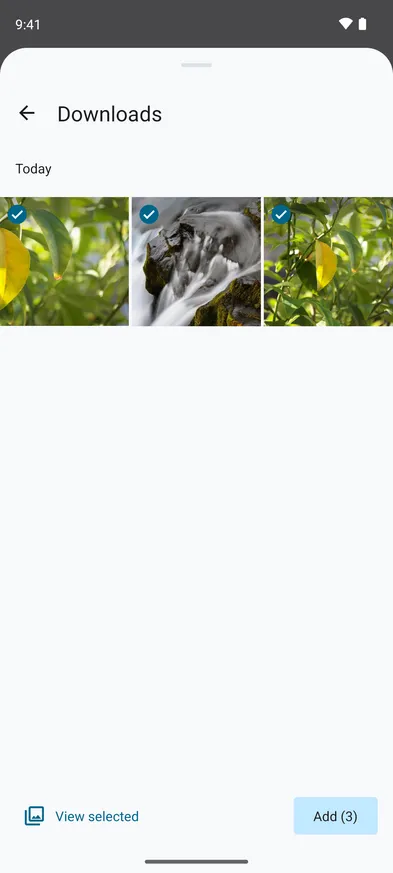
Open Stripix and tap Convert. In the photo picker, images you saved from a browser are under Albums, in Downloads. Select them and tap Add.
The Downloads album in the photo picker, three AVIF images selected.


Step 2: Choose JPG
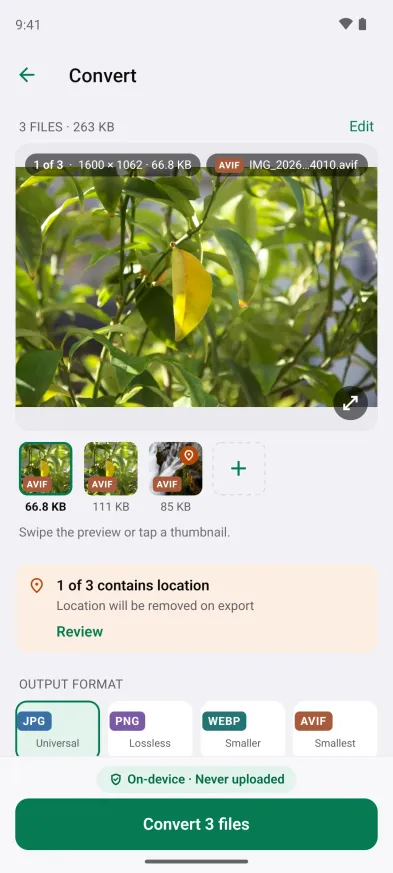
Each file shows an AVIF badge, and JPG at 85% is already selected. Choose PNG instead when an image has a transparent background. Under Quality you see the size the JPGs will have.
Three AVIF images, JPG at 85% quality.
Step 3: Convert
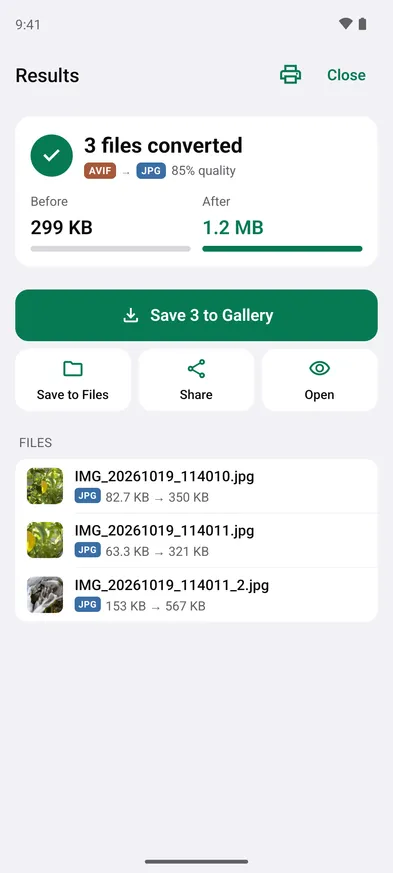
Tap Convert 3 files (the button counts your images). The results show the format change and the size before and after.
Three AVIF images became JPGs, 299 KB → 1.2 MB.
Step 4: Save or send
Tap Save 3 to Gallery to put the JPGs in the Stripix album, Save to Files to pick a folder, or Share to send them straight to another app. The AVIF files stay as they were.
Good to know on Android
- Android 10 and 11 too. Stripix brings its own AVIF decoder, so it opens AVIF on the versions where Android can’t.
- The JPG is bigger. AVIF fits a photo into fewer bytes than JPG. In the example, 299 KB of AVIF became 1.2 MB of JPG. If a form caps the size, reduce the photo to 200 KB afterwards.
- WebP is the other web format. Why images save as WebP, and how to get JPGs on Android covers it.
- RAW works too. Stripix also opens camera RAW files, as Convert DNG and RAW photos to JPG on Android shows.
- Free and Pro. One image at a time to JPG or PNG is free. Batches like the three here, and WebP, AVIF, TIFF or GIF as the output, are part of Pro.
Questions
Why is the image an AVIF in the first place?
Your phone saved what the website sent. Many sites serve AVIF because the files are small and load fast.
Which Android versions does it work on?
Android 10 and later. Stripix decodes AVIF itself, so it doesn't depend on Android's own support.
Can Stripix save images as AVIF too?
Yes, with Pro. Choose AVIF under Output format.
Is the image uploaded to convert it?
No. Stripix converts on your phone, and it works offline.