

Remove location from photos before selling on Marketplace
Short answer
To remove location from photos before selling on Facebook Marketplace, share them from Files to Stripix’s Clean metadata, choose Remove location only and tap Clean 3 photos (the button counts your photos). Then post the clean copies from the Stripix album. Everything runs on your phone. Remove location from photos shows the tool at a glance.
Why remove the location before you sell
Photos you take at home can carry the exact spot where you took them. A listing already shows buyers your area, and that’s all they need. Whether a site also strips the location from the file is up to the site. Remove it yourself, and a buyer never gets more than the area you chose. The same goes for Kleinanzeigen, eBay, Vinted and any other site where strangers see your photos.
Remove the location with Stripix
Step 1: Share the listing photos to Clean metadata
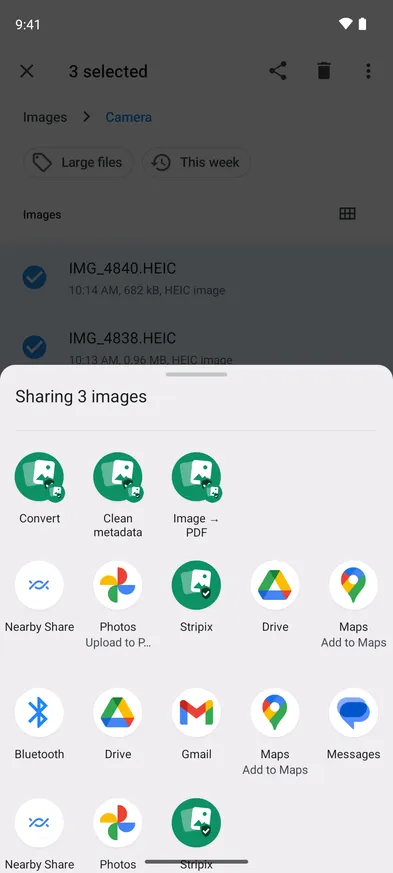
In Files, select the photos for your listing, tap Share and pick Clean metadata under Stripix. If Clean metadata isn’t in the menu, pick Stripix.
The Share menu in Files, with Stripix’s Convert, Clean metadata and Image → PDF.


Step 2: Check the report
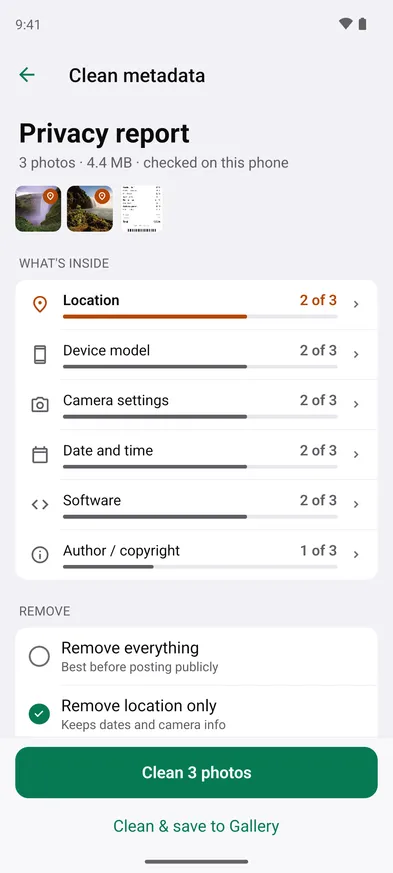
The Privacy report shows how many photos carry each kind of metadata. Location 2 of 3 means two of them would show where they were taken.
The privacy report: two of three photos carry a location.
Step 3: Remove the location
Remove location only is selected and keeps the dates and camera info. Remove everything strips all of it, which is the safer choice for photos strangers see. Tap Clean 3 photos.
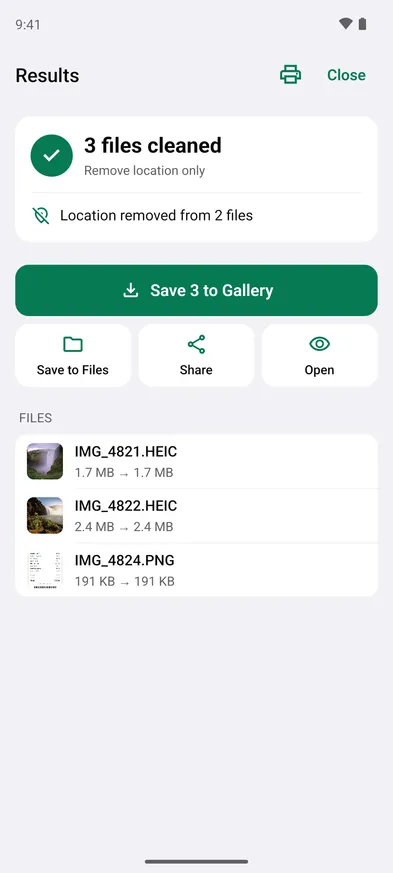
Location removed from 2 files. The screenshot had none.
Step 4: Save and post the copies
Tap Save 3 to Gallery. The clean copies go to a Stripix album. Upload those to your listing, not the originals in Camera, which keep their location.
Every listing in one tap
With Pro, Workflows can do the whole listing at once. One of the templates you can start from is Marketplace listing. It resizes each photo to 2000 × 2000, saves it as JPG at 85%, adds a “© {filename}” watermark and removes the location. Change any step to fit the site you sell on, then tap Run in Workflows for each new listing. On Android, workflows run from the app, not from the Share menu. Workflows and Watermark photos show the tools.
Good to know on Android
- The picture stays the same. Removing metadata doesn’t change what’s in the photo. A house number or a letter on the table stays visible, so check the frame before you post.
- See everything a photo carries. How to see all the metadata in a photo on Android goes through every field.
- Messengers are different. Does Android remove location from photos when you share them? explains which ways of sending keep it.
- Free and Pro. Removing the location from one photo is free. Batches, Remove everything and workflows are part of Pro.
Questions
Doesn't the site remove the location anyway?
Some sites do, but that's their choice and it can change. When you remove it before you upload, the file never carries it.
Does this work for Kleinanzeigen, eBay or Vinted?
Yes. The steps are the same for any site where strangers see your photos.
Do the photos lose quality?
No. Remove location only changes the metadata, not the picture.
Is it free?
Removing the location from one photo is free. Batches, Remove everything and workflows are part of Stripix Pro, which you buy through Google Play.